
If your firm was added to Case Xchange by a partner but you have not yet claimed your account, please follow this article for step-by-step instructions: How to Claim Your Firm.
Permission Requirements:
- User must be a Firm Admin or Account Manager to accept a request.
Receiving a New Request
Existing Firms
- You will receive an email notification when you are added to a new firms network prompting you to log in and accept the request.
- When you log in you will see a notification next to the "Private Network" tab.

New Firms
- After claiming your firm you can log in and accept the request.
- When you log in you will see a notification next to the "Private Network" tab.
Accepting a Relationship
- Login to Case Xchange & open the Private Network ➡️ Manage Relationship

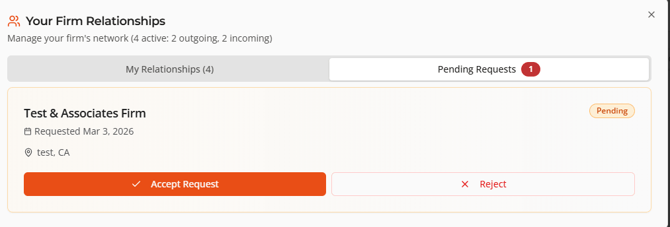
- Open the 'Pending Requests' Tab
- A notification indicator will show how many requests are pending.
- Accept & Reject the pending requests.
- That firm will now be visible in your Private Network.
Having trouble? Contact our Support Team.