
All integrations are configurable via settings, though not are available to all accounts.
Supported Direct Integrations Include:
Don't see your an integration you are looking for? Check our list of Upcoming Integrations.
Access & Manage Integrations
Only Firm Admins & Account Managers can see & manage integrations in Case Xchange.
To see integrations available to your firm:
- Log in to Case Xchange ➡️ Navigate to Settings
- Open Integrations

- View, Manager and Request Access to integrations
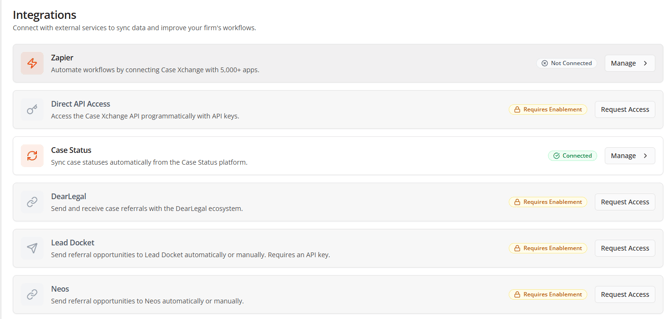
Integration Status Definitions
- Connected
The integration is enabled and actively connected between platforms. To modify settings or update the connection, select Manage and follow the integration documentation. -
Not Connected
The integration is enabled but not yet connected between platforms. To complete setup, select Manage and follow the integration documentation. - Requires Enablement
You do not currently have access to this integration. Select Request Access to submit a ticket and have it enabled for your account. - Requires Enablement
You do not currently have access to this integration. Select Request Access to submit a ticket and have it enabled for your account. - Coming Soon
This integration is currently in development and not yet available. Our team is actively working on it — stay tuned for updates