
Cases can currently be flagged as requiring updates when they're in statuses of sent, under evaluation of investigating. This appears as a red dot in the list view (left image) or as a label next to the status when looking at a case (right image)
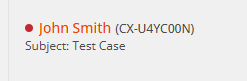
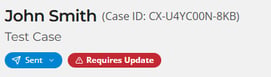
The label appears if the case has not been updated after the period of time set by the sending firm
Configuration (as Sending Firm)
The time after which it gets flagged for requiring an update varies by the status. The defaults for all of them can be set in "Firm Profile" tab of settings under the "Case Expiration Defaults" header. They can also be set specifically in following areas:
- Sent - set when sending a case
- Under Evaluation & Investigating - set on a specific firm relationship via manage network in the private directory